Descriptions Management
The Descriptions Management section in the admin panel allows administrators to view, search, and delete all generated product descriptions across the platform. This page provides a comprehensive overview of every description created by users, along with key metadata.
Overview
Every time a user generates descriptions (single, image‑based, or bulk), the results are stored in the descriptions table. The Descriptions Management page gives administrators full visibility into this data, helping with moderation, auditing, and content quality control.
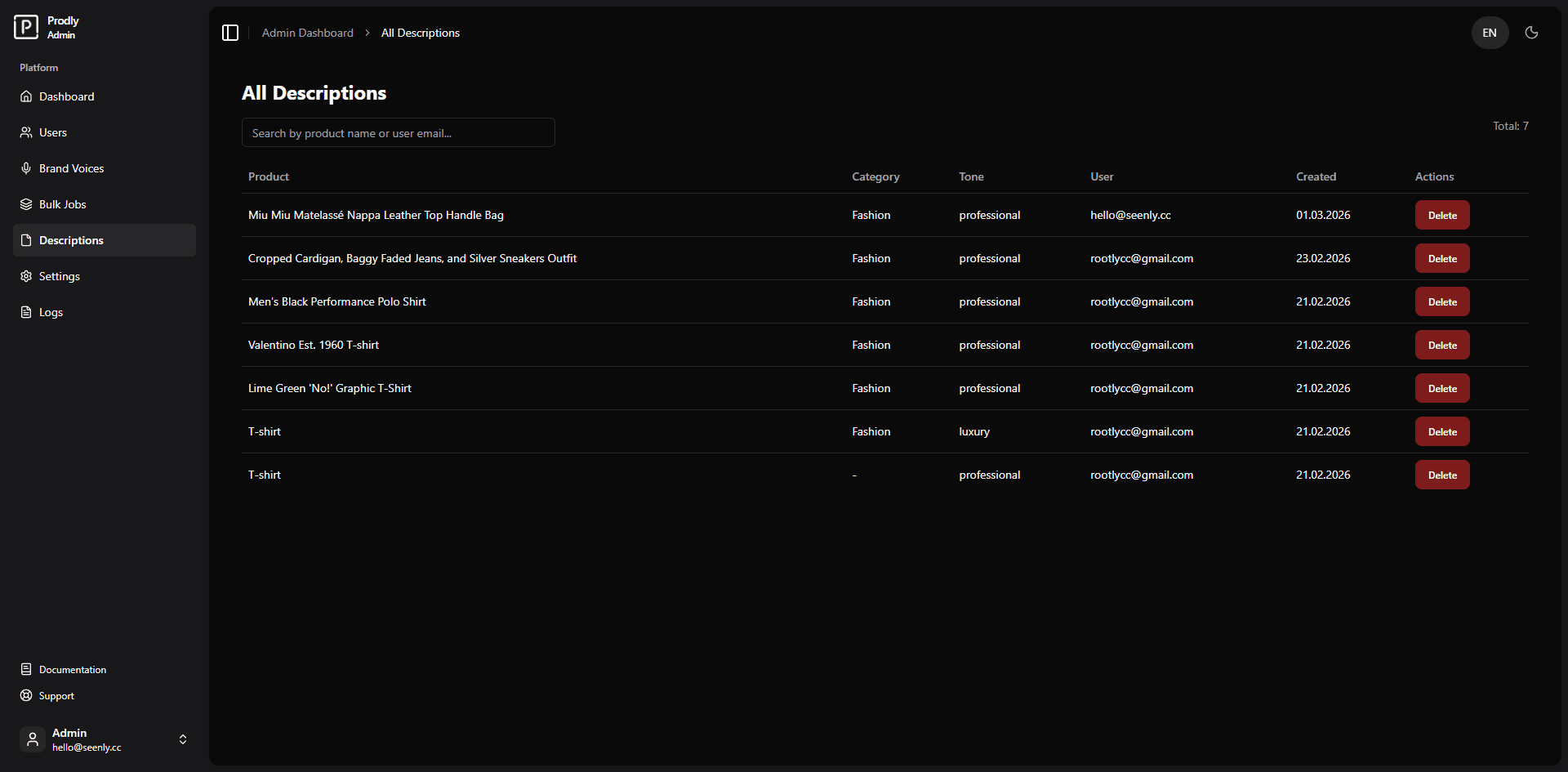 Example of the descriptions management interface (screenshot placeholder)
Features
- View all descriptions – A paginated table listing every description entry.
- Search descriptions – Filter by product name, category, or user email (debounced search).
- Delete single descriptions – Permanently remove a description from the system.
- Pagination – Navigate through large result sets with intelligent page controls.
Using the Descriptions Page
Viewing all descriptions
Navigate to Admin Panel → Descriptions. The table automatically loads the most recent descriptions, showing 10 entries per page. Each row contains:
- Product – The name of the product for which the description was generated.
- Category – The product category (if provided).
- Tone – The tone used for generation (e.g., professional, playful).
- User – Email of the user who generated the description.
- Created – Date of creation.
- Actions – A Delete button to remove the entry.
Searching for descriptions
Type a keyword into the search field. The system filters results by product name, category, and user email. The search is debounced (500 ms delay) to reduce server load, and the page resets to the first page automatically.
Deleting a description
Deleting a description is permanent and cannot be undone.
- Locate the description you want to remove.
- Click the Delete button in the corresponding table row.
- A browser confirmation dialog will appear – confirm the deletion.
- A success toast notification confirms the removal, and the table refreshes automatically.
Technical Details
- Data source:
descriptionstable joined withuser_profilesto retrieve the owner’s email. - API endpoints:
GET /api/admin/descriptions?search=...&page=...&limit=10– fetches paginated descriptions.DELETE /api/admin/descriptions?id=...– deletes a specific description.
- Debounced search: Implemented with
lodash/debounceto avoid excessive API calls. - Pagination: Configurable page size (default 10) with a compact page range that includes ellipsis.
Conclusion
The Descriptions Management page equips administrators with essential tools for monitoring and moderating all generated content. With powerful search and simple deletion, it ensures that the platform maintains high‑quality, appropriate descriptions.